
Configuration reference
This page covers all plugin settings, the custom block entity field glossary, and the ACL permission structure.
Plugin settings
These settings are configured in Extensions > My extensions > CMS Block Builder > Configure (or via the Shopware admin system configuration).
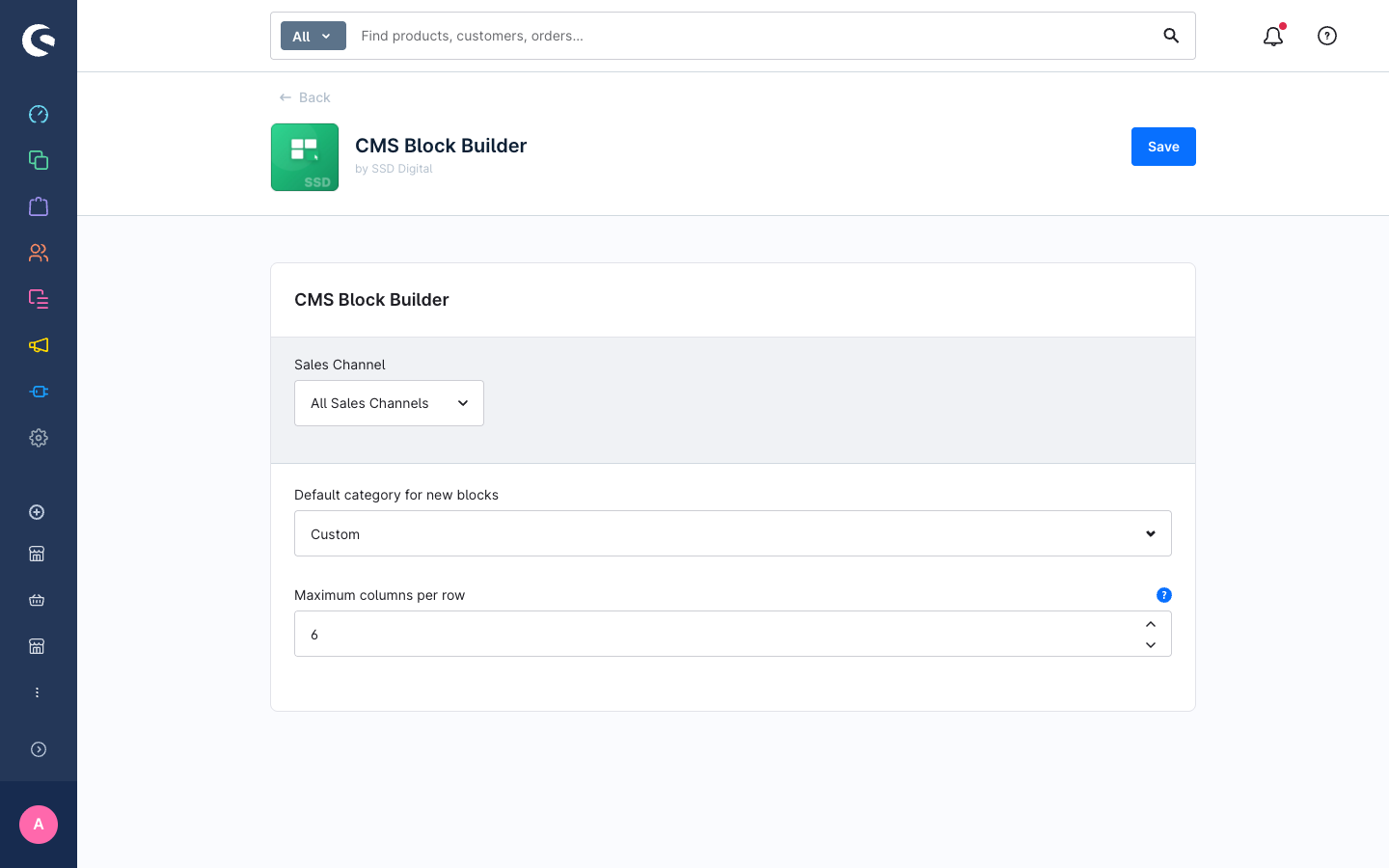
CMS Block Builder
| Setting | Type | Default | Description |
|---|---|---|---|
defaultCategory — Default category for new blocks | single-select | custom | Options: custom (Custom), text-image (Text & Image), commerce (Commerce), video (Video). |
maxColumnsPerRow — Maximum columns per row | int | 6 | The maximum number of columns a merchant can add to a single row in the block composer. |
Entity: ssd_custom_block
Each custom block is stored as one row in this entity. The entity is translatable — the label field stores per-language display names.
| Field | Type | Required | Description |
|---|---|---|---|
id | UUID (binary 16) | Yes | Primary key. Generated automatically. |
technicalName | string | Yes | Unique identifier used as the CMS block type (ssd-custom-<technicalName>). Immutable after creation. |
label | string (translatable) | Yes | Human-readable display name shown in the CMS block picker. |
category | string | Yes | Category group in the block picker. One of: custom, text-image, commerce, video, or any other category present in the Shopware block registry. |
gridConfig | JSON | Yes | 12-column CSS Grid area definitions per breakpoint. See data model below. |
slots | JSON | Yes | Slot-ID-to-element-type mapping. Keys are area IDs from gridConfig; values are { type, config } objects. |
previewMediaId | UUID (FK to media) | No | Optional preview image shown in the block picker. |
position | int | No | Sort order within a category in the block picker. Default: 0. Lower values appear first. |
active | bool | No | Whether the block is registered in the block picker. Default: true. |
createdAt | datetime | Yes | Set automatically on creation. |
updatedAt | datetime | No | Updated automatically on save. |
Translation entity: ssd_custom_block_translation
| Field | Type | Description |
|---|---|---|
ssd_custom_block_id | UUID | FK to ssd_custom_block. |
language_id | UUID | FK to language. |
label | string | Translated display name for this block. |
gridConfig data model
{
  "columns": 12,
  "gridRows": 4,
  "breakpoints": {
    "desktop": {
      "areas": [
        { "id": "slot-0", "rowStart": 0, "colStart": 0, "rowEnd": 1, "colEnd": 6 },
        { "id": "slot-1", "rowStart": 0, "colStart": 6, "rowEnd": 1, "colEnd": 12 }
      ]
    },
    "tablet": { "areas": [] },
    "mobile": { "areas": [] }
  }
}columns— always12. The grid is a fixed 12-column CSS Grid.gridRows— number of rows in the grid canvas. Minimum1.breakpoints.desktop.areas— the authoritative layout. Each area has a slotid, zero-basedrowStart/rowEnd/colStart/colEndin CSS Grid terms.breakpoints.tablet.areas/breakpoints.mobile.areas— optional independent layouts. Empty arrays mean the desktop layout is used as a fallback at that breakpoint.
slots data model
{
  "slot-0": { "type": "image", "config": {} },
  "slot-1": { "type": "text", "config": {} }
}
Keys are area IDs from gridConfig.breakpoints.desktop.areas. The type value is the Shopware CMS element type name (e.g. text, image, product-slider). The config object holds element-level defaults (currently unused; element configuration is stored in the CMS page data).
ACL permissions
The plugin registers a permission group called CMS Block Builder under the Content category in Shopware's role management.
| Role | Privileges granted | Dependencies |
|---|---|---|
ssd_custom_block.viewer | ssd_custom_block:read, ssd_custom_block_translation:read, media:read, cms_block:read | None |
ssd_custom_block.editor | ssd_custom_block:update, ssd_custom_block_translation:update/create/delete, media:create/update | viewer |
ssd_custom_block.creator | ssd_custom_block:create, ssd_custom_block_translation:create | viewer, editor |
ssd_custom_block.deleter | ssd_custom_block:delete, cms_block:read, cms_section:read, cms_page:read | viewer |
Assign these roles in Settings > System > User management > Roles. A typical content editor needs viewer + editor. A content manager also needs creator. Only administrators should have the deleter role.
Storefront rendering
The plugin overrides cms-section-block-container.html.twig to intercept any block whose type starts with ssd-custom-. For those blocks it renders cms-block-ssd-custom-block.html.twig, which:
- Reads the
ssdCustomBlockextension attached byCustomBlockRegistrationSubscriberat page load time. - Builds three CSS Grid containers — desktop, tablet, and mobile — each positioned using
grid-columnandgrid-rowinline styles from the area definitions. - Includes the standard Shopware CMS element template for each slot.
Responsive switching is handled in base.scss using Bootstrap's media-breakpoint-down() mixins: the desktop grid is shown by default; the tablet grid replaces it at ≤ md; the mobile grid replaces both at ≤ sm.
Block registration flow
At runtime the plugin follows this sequence to make custom blocks available in the CMS editor:
CustomBlockCmsSubscriberlistens toGenericPageLoadedEventand attaches active blocks to the page as assdCustomBlocksextension.CustomBlockRegistrationSubscriberlistens toCmsPageLoadedEventand attaches the matchinggridConfigandslotsto eachssd-custom-*block on the page as assdCustomBlockextension.- On the admin side,
ssd-cms-block-registry.jsoverridessw-cms-sidebarand callscmsService.registerCmsBlock()for each active block fetched from the API, making them available in the block picker.