
Track what an offer earns
Goal: read the per-offer statistics — impressions, clicks, accepts and attributed revenue — and understand where the numbers come from.
Open the statistics
In Marketing > Ultimate Upsell, select an offer and open its Stats tab (also reachable via ⋯ > View stats in the sidebar).
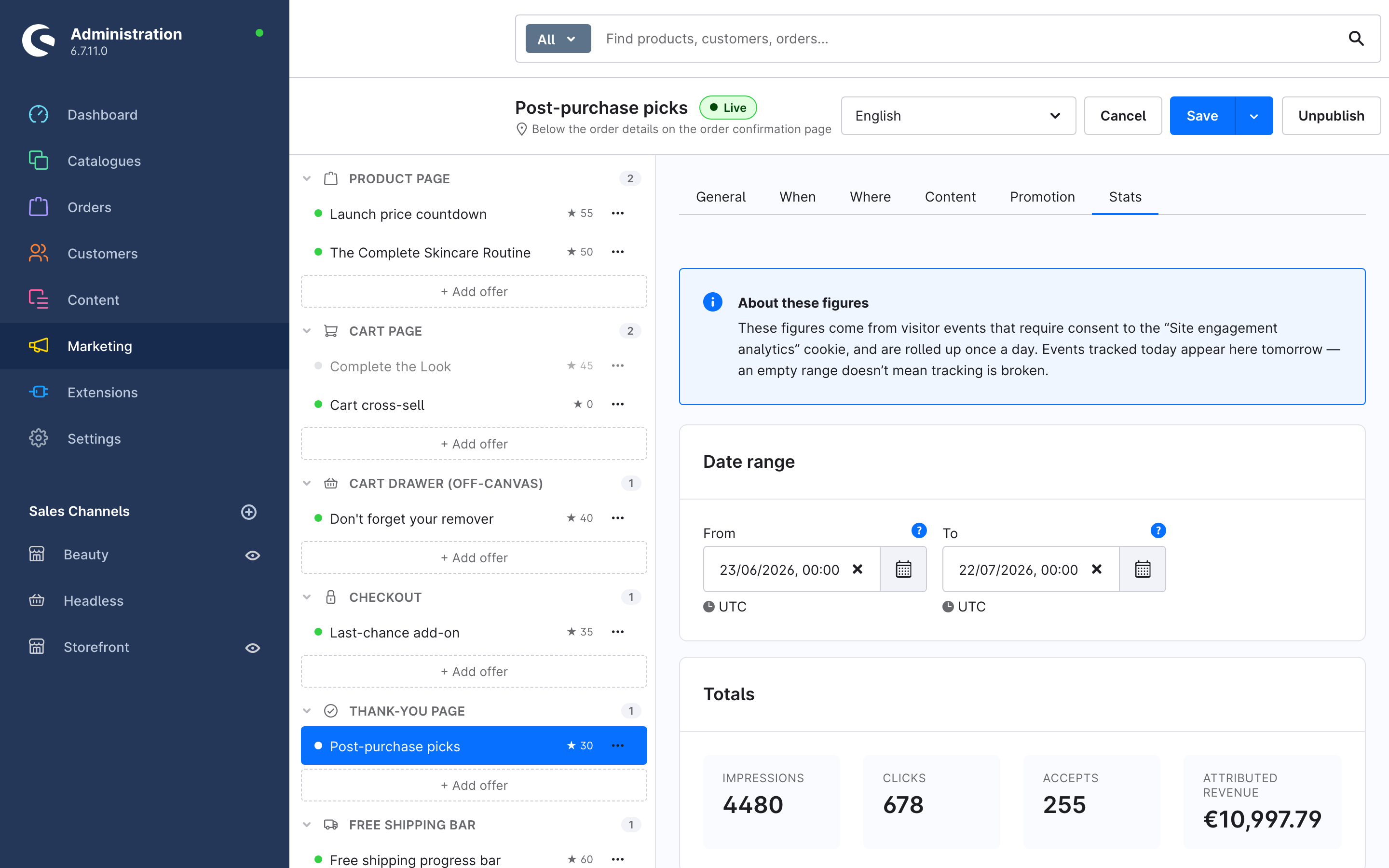
The tab shows, for the selected date range (default: the last 30 days):
| Figure | Meaning |
|---|---|
| Impressions | The offer entered a shopper's viewport. Counted once per page view. |
| Clicks | A shopper clicked into the offer (product link or button). |
| Accepts | A shopper added the offered product(s) to the cart from the offer. |
| Attributed revenue | Order revenue from line items that were added through this offer. Shown per currency where several occur. |
The Daily breakdown chart plots the same four series per day.
Where the numbers come from
- Impressions, clicks and accepts are visitor events. They require the shopper's consent to the Site engagement analytics cookie (part of Shopware's "Statistical" cookie group in the consent banner). Shoppers who decline are not tracked.
- Attributed revenue works differently: when a shopper adds a product through an offer, the line item is stamped with the offer's id. When the order is placed, the revenue is attributed to that offer. This is first-party order data, not tracking, so it does not depend on the cookie.
- Events are rolled up once a day. Events tracked today appear in the statistics tomorrow — an empty range does not mean tracking is broken.
Turn tracking off
Set Enable storefront tracking to off in the plugin configuration (Extensions > My extensions > Ultimate Upsell Engine > Configuration). No impression/click/accept events are written and the View stats actions are hidden in the admin. See the configuration reference.
Deeper analysis
If the SSD Advanced Analytics plugin is installed, two data sources — Upsell events (raw) and Upsell performance (daily) — become available there, with breakdowns by offer, product, event type and sales channel, and metrics such as click-through rate, accept rate and revenue per impression.