
How to generate a Packaging Efficiency Report
A Packaging Efficiency Report is PackGuard's internal record for one box type. It shows the box's specifications, the average empty space ratio across all recorded orders using that box, and how that average compares with your configured threshold.
The report is not the EU declaration of conformity from Article 39 of Regulation (EU) 2025/40 — that document is drawn up by the packaging manufacturer and covers other requirements. Use the report to track and document your own empty-space performance.
Prerequisite:
- At least one box in the catalog that has been used on orders (so there is real order data)
- Company name configured in plugin settings (recommended — the PDF shows a placeholder otherwise)
Step 1 — Open the box
Go to Orders > PackGuard > Box Catalog and click on the box you want to generate the report for.
Step 2 — Open the preview modal
In the box detail smart-bar, click Generate report.
The preview modal shows:
- Prepared by — the company name from plugin configuration (or a placeholder if not set)
- Packaging specifications — name, material, internal dimensions and internal volume
- Empty space — average empty space ratio across all tracked orders using this box, the configured threshold, and a statement on whether the box stays within it
- Generated on — current date
If Company name is not configured, a yellow alert appears at the top of the modal. Click Open plugin configuration to fill it in, then re-open the modal.
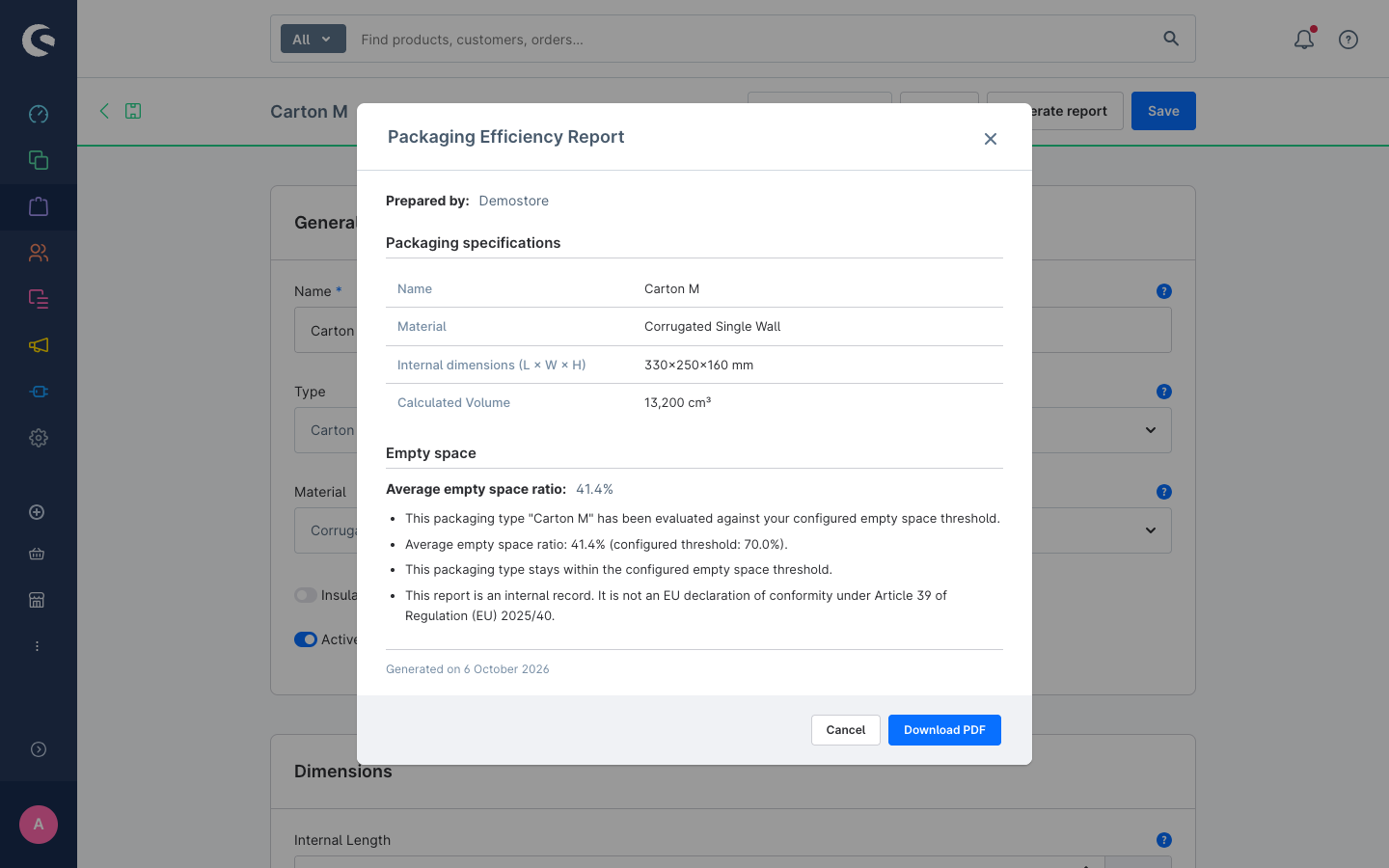
Step 3 — Download the PDF
Click Download PDF in the modal footer.
The file downloads as Packaging_Efficiency_Report_{BoxName}_{YYYY-MM-DD}.pdf. It contains the same information as the preview, rendered with self-contained inline CSS. The title and subtitle (default: "Packaging Efficiency Report" / "Regulation (EU) 2025/40, Article 24") are set in plugin configuration and appear at the top of the PDF.
The PDF uses the content language selected in the administration: labels, box name, material, numbers and date follow that language. Title and subtitle are the text you entered in the configuration.
Customise the PDF header
Go to Extensions > My extensions > PackGuard > Configuration.
- Report title — the main heading on the PDF (default:
Packaging Efficiency Report) - Report subtitle — the subtitle below the heading (default:
Regulation (EU) 2025/40, Article 24). Clear this field to hide the subtitle. - Company name — shown as the author of the report. Leave empty to use the shop name.
When does the report say "WARNING"?
If the average empty space ratio for the box type is above the configured block threshold, the PDF includes a warning statement:
WARNING: This packaging type currently exceeds the configured empty space threshold. Corrective action is recommended.
This does not prevent you from downloading the document, but it signals that you should review your box selection practices for this box type.
Re-generating the report
Each download is generated fresh from the current data. Re-generate the PDF after:
- the box's dimensions are updated
- more orders have been processed (the average empty space ratio will change)
- plugin configuration is changed (company name, title, subtitle)