
Generate a reel from product images
Goal: create a reel for a product that has photos but no video. The plugin animates the product's existing images into a vertical 1080 × 1920 MP4 — rendered in your browser, saved to the media library, and registered as a normal reel with the product already tagged.
Requirement: the generator uses browser video encoding and needs Chrome or Edge on the admin side. Shoppers are unaffected — playback works in every browser. In an unsupported browser the page tells you so and offers the upload path instead.
Steps
- Open Content > ReelCart > Reels and click Generate from a product.
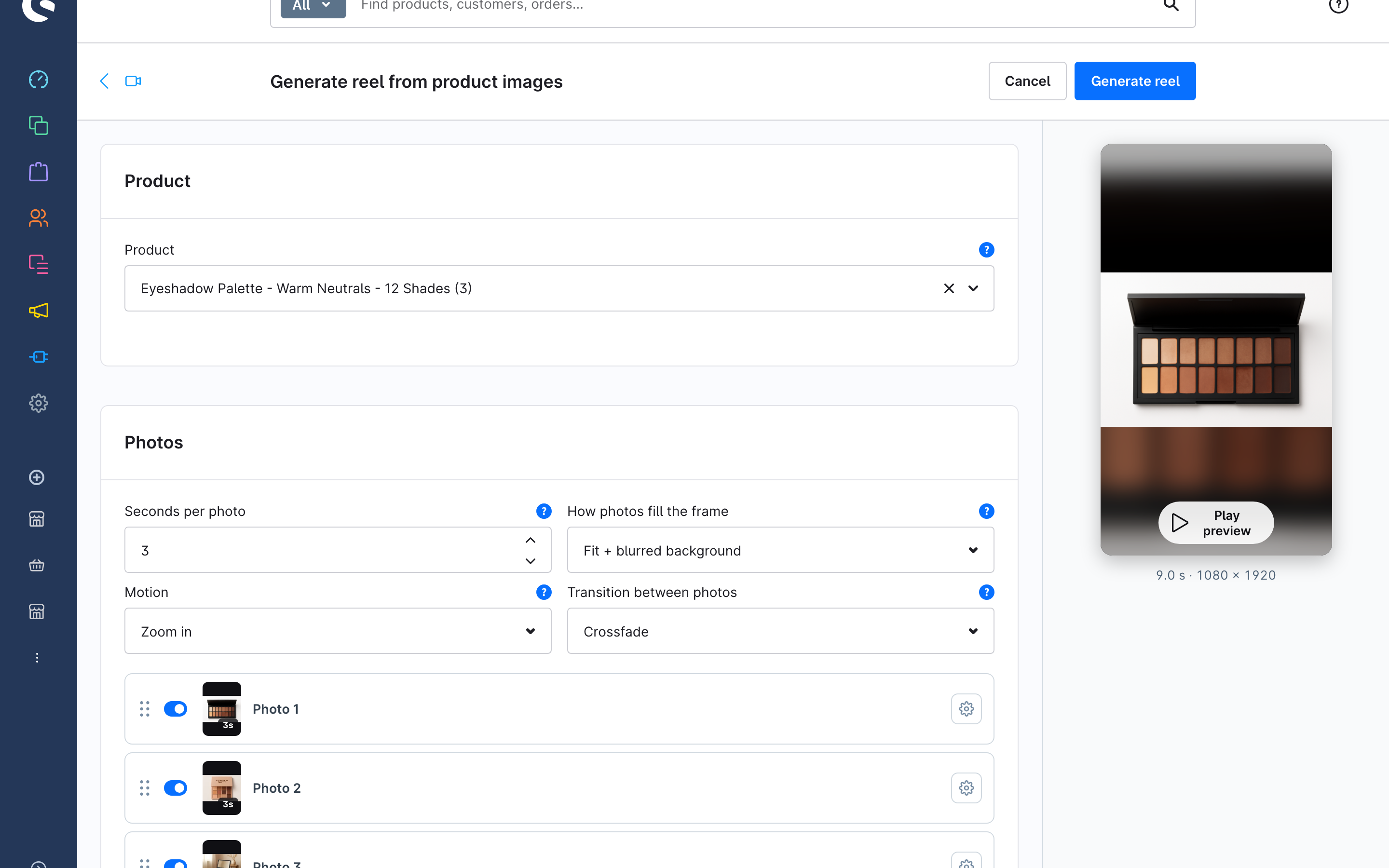
- In Product, search and pick the product. Only main and standalone products are listed. Its images load into the Photos card and the preview on the right starts playing.
- Decide the global look:
- Seconds per photo — 1–15 s; applies to every photo unless overridden.
- How photos fill the frame — Fit + blurred background (whole photo over a blurred copy of itself), Fit + colour (whole photo on a solid background colour you pick), or Fill (crop) (photo cropped to fill the frame — best for photos that are already vertical).
- Motion — slow zoom in, zoom out, a gentle pan, or static.
- Transition between photos — crossfade, cut, or slide.
- Tune individual photos: drag the tiles to reorder, switch a tile off to exclude it, and use the cog to Customise this photo with its own duration, fit or motion. Follow global settings resets it.
- Watch the preview (Play preview). The badge under it shows the total length.
- Click Generate reel. A progress bar shows the render; when it finishes, the reel opens in the editor.
Afterwards
The generated reel is an ordinary reel: rename it, change the cover frame, add more products, put it in playlists — see Upload a reel and tag products.
Limits
The Maximum reel duration and Maximum upload size limits apply to generated reels too. If the selected photos add up to more than the duration limit, the generator refuses before rendering; remove photos or shorten their duration.