
Configuration reference
All settings live under Extensions > My extensions > ReelCart > Configuration. Every setting is off or at a conservative default after installation, so the plugin changes nothing in your storefront until you decide to. Settings can be set per sales channel using the Sales Channel selector at the top of the page.
The tables below are generated from the plugin's config.xml, so the names, defaults and descriptions match exactly what the admin shows.
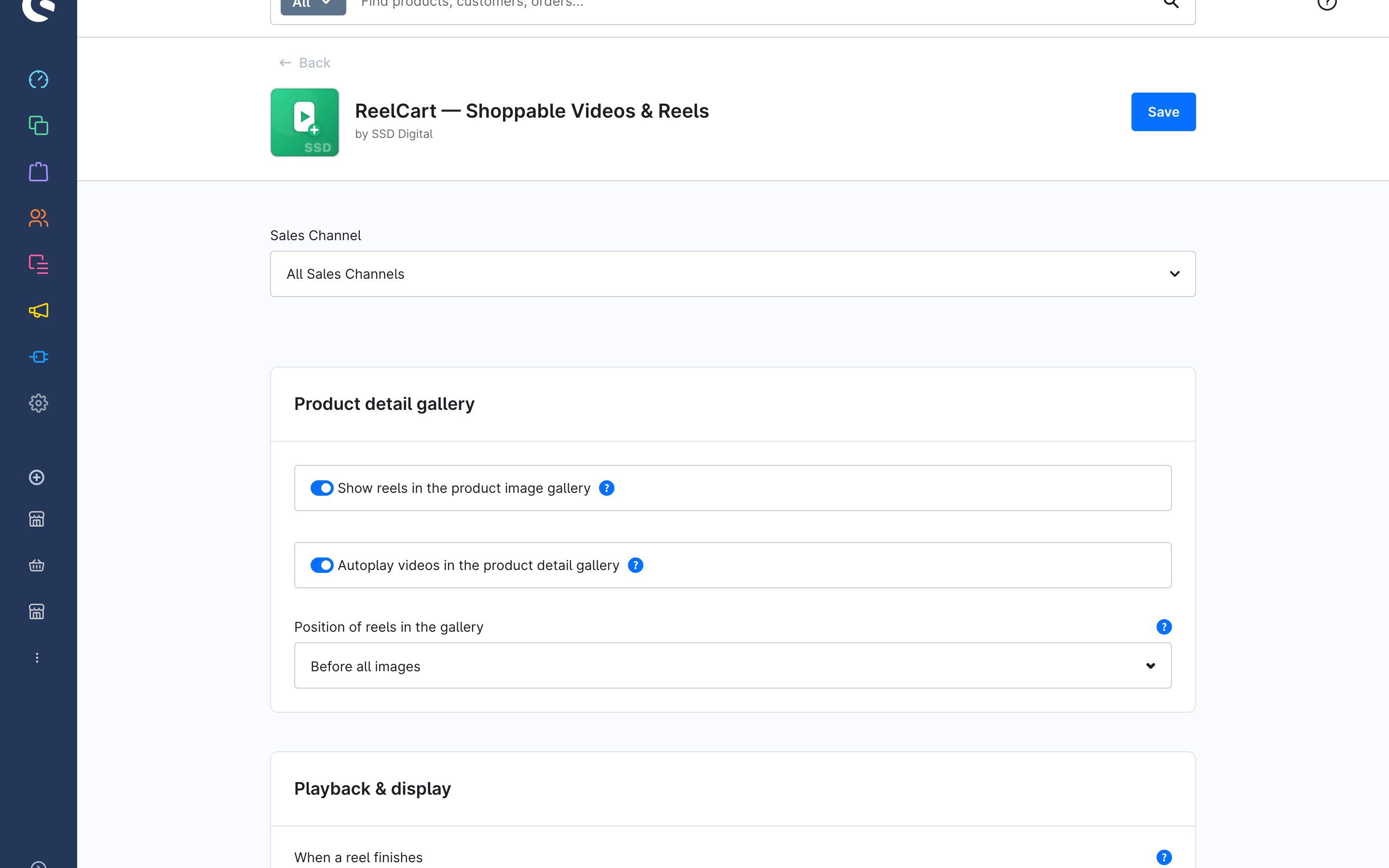
Settings
Product detail gallery
| Setting | Type | Default | Description |
|---|---|---|---|
galleryInjectionEnabled — Show reels in the product image gallery | bool | false | Adds each product's reels as slides in its image gallery — no CMS element needed. Leave off to place the Shoppable Video element yourself. |
galleryAutoplay — Autoplay videos in the product detail gallery | bool | false | Video slides on the detail page play automatically — muted and looping — instead of on click. Affects all video slides, not just reels. |
galleryInjectionPosition — Position of reels in the gallery | single-select | afterCover | Where reel slides sit among the product images. After the cover image is recommended, so the product photo still shows first. Options: first (Before all images), afterCover (After the cover image), last (After all images). |
Playback & display
| Setting | Type | Default | Description |
|---|---|---|---|
viewerEndBehavior — When a reel finishes | single-select | next-wrap | Applies to the fullscreen player. While a shopper is viewing a product, the current reel keeps replaying. Options: next-wrap (Play the next reel, then start over), next-close (Play the next reel, then close), loop (Replay the current reel), stop (Pause at the end). |
cardRatingEnabled — Show the star rating on the reel card | bool | false | Adds the product's review stars between its name and price on the card over the video. Products without reviews show empty stars, which keeps every card the same height. |
Upload limits
| Setting | Type | Default | Description |
|---|---|---|---|
maxUploadSizeMb — Maximum upload size (MB) | int | 50 | Largest reel file (MB) allowed on upload. Keep it modest — reels are self-hosted from your media storage. |
maxDurationSeconds — Maximum reel duration (seconds) | int | 60 | Longest reel (seconds) allowed. Shorter clips load faster; longer uploads are rejected. |
SEO & analytics
| Setting | Type | Default | Description |
|---|---|---|---|
videoSeoEnabled — Add video structured data | bool | false | Adds schema.org VideoObject markup so reels can show as video rich results in search. Turn off if another SEO app already adds video markup. |
analyticsEnabled — Measure reel performance | bool | false | Records anonymous first-party events and reel-attributed revenue for the Analytics dashboard. Cookieless and self-hosted. Turn off to stop all measurement. |
Admin permissions (ACL)
ReelCart registers one permission group, ReelCart, under Content in Settings > Users & permissions > Roles. The four roles build on each other:
| Role | Allows |
|---|---|
| Viewer | Open the ReelCart module and read reels, playlists, floating reels, analytics and the product Reels card. |
| Editor | Edit existing reels, playlists and floating reels; tag products; set and remove a product's cover reel; upload media; change the plugin settings. Requires Viewer. |
| Creator | Create new reels (upload and generate), playlists and floating reels. Requires Viewer and Editor. |
| Deleter | Delete reels, playlists and floating reels. Requires Viewer. |
Placing the Shoppable Video or Playlist hub element additionally needs the normal Shopping Experiences permissions.
Data model
Everything the plugin stores is in its own tables (prefix ssd_reel_cart_). Uninstalling the plugin removes them.
| Entity | What it is | Key fields |
|---|---|---|
Reel (ssd_reel_cart_video) | One video in the library. | active, title and description (translatable), media (the MP4), posterMedia (cover image), duration_ms, width, height |
Reel product (ssd_reel_cart_video_product) | One product in a reel's list — both what the reel sells and where it shows. | video_id, product_id, sort_order |
Product cover (ssd_reel_cart_product_cover) | Records that a reel is a product's cover so it can be reverted. | product_id, reel_video_id, previous_cover_id |
Playlist (ssd_reel_cart_playlist) | An ordered set of reels. | active, title (translatable), default_layout (single, carousel, grid, stories-bar) |
Playlist item (ssd_reel_cart_playlist_video) | A reel's position in a playlist. | playlist_id, video_id, position |
Floating reel (ssd_reel_cart_floating) | A corner-bubble campaign. | active, name, priority, content_source (reel, playlist, product), reel_id, playlist_id, position (bottom-left, bottom-right), reshow_policy (session, day, week, never), targeting_mode (page_restriction, custom_url), target_routes (home, product, category, search, landing), custom_urls; relations to sales channels, rules, categories, products |
Event (ssd_reel_cart_event) | One anonymous interaction, written only while measurement is on. | type (impression, play, complete, card_click, add_to_cart, purchase), reel, product, sales channel, order line item for purchases |
Stat (ssd_reel_cart_stat) | Aggregated per-reel figures that back the dashboard and list columns. | stat_date, video_id, sales_channel_id, impressions, watched, add_to_cart |
Storefront endpoints
These routes exist on the storefront for the plugin's own JavaScript; you do not need to call them, but a firewall or cache rule should let them through:
| Route | Purpose |
|---|---|
GET /ssd-reel-cart/feed/{slotId} | Next page of reels for an automatic product source (12 per page). |
GET /ssd-reel-cart/hub/{slotId} | Next rows for the Playlist hub. |
GET /ssd-reel-cart/options/{productId} | Product panel for a chosen variant in the viewer. |
POST /ssd-reel-cart/event | Records an analytics event (only while measurement is on). |
Tiers
ReelCart is sold as a single tier. Every feature described in this manual is included; there is no feature gating by plan.